
DeepSeek API Best Practices for V4 in Production

You shipped a prototype against `deepseek-chat`, traffic grew, and now the bills, the latency tail, and the occasional empty JSON response are real problems. This guide is the set of DeepSeek API best practices I apply to my own V4 deployments after migrating from V3.2 the week the Preview dropped. It assumes you have an API key and a working OpenAI SDK call, and focuses on the choices that actually move cost, reliability, and quality once you go past “hello world.” You will get a tier-selection rubric, the parameter map for thinking mode, a worked cost calculation for both V4-Pro and V4-Flash, caching tactics, JSON-mode caveats, and an error-handling pattern that survives launch-week throttling.
What the DeepSeek API actually is in April 2026

The DeepSeek API is a stateless HTTP service that accepts OpenAI-compatible Chat Completions requests at POST /chat/completions against the base URL https://api.deepseek.com. As of the V4 Preview announcement on April 24, 2026, DeepSeek-V4-Pro has 1.6T total / 49B active params with performance rivaling top closed-source models, and DeepSeek-V4-Flash has 284B total / 13B active params as a fast, efficient, and economical choice. Both ship as open-weight Mixture-of-Experts models under the MIT license, both default to a 1,000,000-token context, and both can produce up to 384,000 output tokens per response.
Two architectural facts shape every best practice that follows. First, the API supports OpenAI ChatCompletions and Anthropic APIs, and both models support 1M context and dual modes (Thinking / Non-Thinking). Second, the API is stateless — DeepSeek does not retain conversation history server-side. The web chat at chat.deepseek.com keeps your sessions; the API does not. You resend the full messages array on every call.
Legacy IDs and the migration window
If your codebase still references deepseek-chat or deepseek-reasoner, it works today and will continue to work for a few more months. deepseek-chat and deepseek-reasoner will be fully retired and inaccessible after Jul 24th, 2026, 15:59 (UTC Time), currently routing to deepseek-v4-flash non-thinking/thinking. The migration is a one-line change: keep base_url, just update model to deepseek-v4-pro or deepseek-v4-flash. There is no excuse to leave it until retirement week. Switch in a feature flag, run for a day, delete the legacy ID. Our DeepSeek OpenAI SDK compatibility notes cover the exact import paths.
Quickstart: the call you should be making in 2026
Below is the minimal Python snippet I now use as a template. It targets deepseek-v4-flash — the right default for chat, classification, summarisation, and most agent tool-calls — and explicitly disables thinking via extra_body={"thinking": {"type": "disabled"}} for cost reasons (V4 enables thinking by default).
from openai import OpenAI

client = OpenAI(
    api_key="sk-...",                 # from the DeepSeek console
    base_url="https://api.deepseek.com",
)

resp = client.chat.completions.create(
    model="deepseek-v4-flash",
    messages=[
        {"role": "system", "content": "You are a concise technical assistant."},
        {"role": "user", "content": "Explain context caching in two sentences."},
    ],
    temperature=1.3,                   # DeepSeek's recommended chat default
    max_tokens=512,
    stream=False,
    extra_body={"thinking": {"type": "disabled"}},  # V4 enables thinking by default; explicit disable keeps cost low
)
print(resp.choices[0].message.content)
The same call against POST /chat/completions in curl looks like this; useful for smoke-testing from CI without an SDK:
curl https://api.deepseek.com/chat/completions
  -H "Authorization: Bearer $DEEPSEEK_API_KEY"
  -H "Content-Type: application/json"
  -d '{
    "model": "deepseek-v4-flash",
    "messages": [{"role": "user", "content": "ping"}],
    "max_tokens": 32
  }'
For a guided walkthrough of authentication, billing setup, and your first call, see our DeepSeek API getting started tutorial and the page on how to get a DeepSeek API key.
Pick the right tier — V4-Flash or V4-Pro
The single highest-use decision for a DeepSeek API production deployment is which tier you route to. V4-Pro is roughly an order of magnitude more expensive on output, so the default should be Flash, with Pro reserved for tasks that empirically benefit.
| Dimension | deepseek-v4-flash | deepseek-v4-pro |
|---|---|---|
| Total / active params | 284B / 13B | 1.6T / 49B |
| Context window | 1,000,000 tokens | 1,000,000 tokens |
| Max output | 384,000 tokens | 384,000 tokens |
| Input, cache hit ($/1M) | $0.0028 | $0.003625 (promo, list $0.0145) |
| Input, cache miss ($/1M) | $0.14 | $0.435 (promo, list $1.74) |
| Output ($/1M) | $0.28 | $0.87 (promo, list $3.48) |
| Best for | Chat, classification, summarisation, RAG, most tool-calls | Frontier coding, long-horizon agents, hard reasoning |
Rates are from DeepSeek’s official pricing page as of April 25, 2026 and corroborated by independent trackers such as deepseek-v4-flash costs $0.0028 per 1M cache-hit input tokens, $0.14 per 1M cache-miss input tokens, and $0.28 per 1M output tokens; deepseek-v4-pro costs $0.003625 per 1M cache-hit input tokens, $0.435 per 1M cache-miss input tokens, and $0.87 per 1M output tokens during the 75% promo through 2026-05-31 (list rates $0.0145 / $1.74 / $3.48). Off-peak discounts that V3 users may remember are no longer in effect — they ended September 5, 2025 and were not reintroduced for V4. For a live calculator, see the DeepSeek pricing calculator.
A simple routing rule
- Start every new feature on V4-Flash. Build evals.
- If your eval shows V4-Flash failing on a category — typically agentic coding, multi-step tool use, or hard math — re-run that subset on V4-Pro.
- If Pro lifts pass-rate by enough to justify ~7× output cost on those calls, route only that category to Pro. Keep everything else on Flash.
DeepSeek says both models are more efficient and performant than DeepSeek V3.2 due to architectural improvements, and have almost “closed the gap” with current leading models on reasoning benchmarks; V4-Pro with reasoning_effort=max outstrips OpenAI’s GPT-5.2 and Gemini 3.0 Pro on some tasks, but those wins concentrate in maximum-effort thinking — not the cheap fast path most chat traffic should take.
Use thinking mode deliberately, not by default
In V4, thinking is a request parameter on either tier, not a separate model ID. Three settings:
- Non-thinking — V4 enables thinking by default; pass
extra_body={"thinking": {"type": "disabled"}}for non-thinking. Fastest and cheapest. The right opt-in for chat, RAG, and structured extraction. - Thinking (high) —
reasoning_effort="high"withextra_body={"thinking": {"type": "enabled"}}. Returnsreasoning_contentalongside the finalcontent. Use for multi-step reasoning, planning, hard math. - Thinking-max —
reasoning_effort="max". Reserved for the hardest agent and reasoning workloads. For the Think Max reasoning mode, set the context window to at least 384K tokens or you will get truncated outputs.
One trap: thinking mode does not support the temperature, top_p, presence_penalty, or frequency_penalty parameters; for compatibility, setting these will not trigger an error but will also have no effect. If your code carefully tunes temperature=0.0 for code generation and you flip thinking on, the temperature is silently ignored. Plan accordingly.
A thinking-mode call:
resp = client.chat.completions.create(
    model="deepseek-v4-pro",
    messages=[{"role": "user", "content": "Plan a zero-downtime DB migration."}],
    reasoning_effort="high",
    extra_body={"thinking": {"type": "enabled"}},
)
print(resp.choices[0].message.reasoning_content)  # the reasoning content
print(resp.choices[0].message.content)            # the final answer
Tune temperature to the task
DeepSeek publishes specific temperature recommendations — match them unless you have a reason not to.
| Task | Recommended temperature |
|---|---|
| Code generation, mathematics | 0.0 |
| Data analysis, data cleaning | 1.0 |
| General conversation, translation | 1.3 |
| Creative writing, poetry | 1.5 |
If you find yourself at temperature=0.7 across the board, you are probably leaving determinism on the table for code paths and creativity for writing paths. More on prompt-side tuning lives in our DeepSeek prompt engineering guide.
Caching: the cheapest ~98% you will ever buy
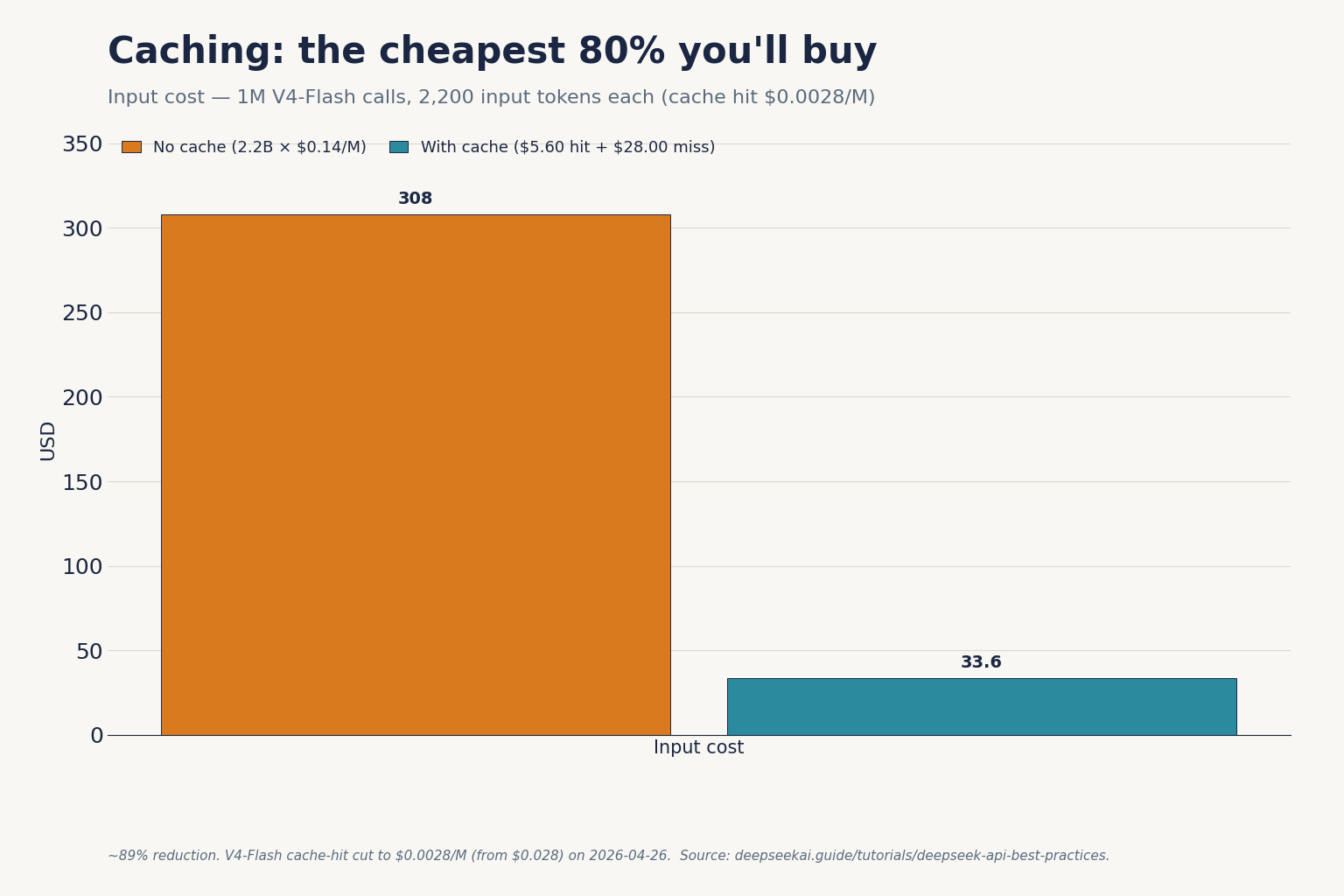
Context caching applies automatically when DeepSeek detects a repeated message prefix. The cache-hit input rate is roughly 50× cheaper than the cache-miss rate on V4-Flash (a ~98% reduction since the 2026-04-26 cache-hit rate drop) and ~99% cheaper on V4-Pro at promo rates. The implications:
- Put the long, stable content (system prompt, retrieval results that recur, few-shot examples) at the beginning of
messages. Volatile content (the user’s new question) goes last. - Avoid timestamps, request IDs, or randomised greetings in your system prompt. Each one is a cache-miss waiting to happen.
- Cache hits do not free you from paying for the user’s new tokens. The miss line in your bill is the new turn against the cached prefix.
For implementation specifics and how the prefix matcher behaves under streaming and tool calls, see our deep dive on DeepSeek context caching.
A worked cost example for both tiers
Workload: 1,000,000 calls per day, each with a 2,000-token system prompt that the cache catches, a 200-token user message that does not, and a 300-token response.
V4-Flash (the default recommendation)
Cached input :  2,000 × 1,000,000 = 2,000,000,000 tok × $0.0028/M = $5.60
Uncached in  :    200 × 1,000,000 =   200,000,000 tok × $0.14/M   = $28.00
Output       :    300 × 1,000,000 =   300,000,000 tok × $0.28/M   = $84.00
                                                                   -------
Total                                                               $117.60
V4-Pro (frontier-tier, same workload)
Cached input :  2,000,000,000 tok × $0.003625/M (promo) = $7.25     (list $29.00)
Uncached in  :    200,000,000 tok × $0.435/M    (promo) = $87.00    (list $348.00)
Output       :    300,000,000 tok × $0.87/M     (promo) = $261.00   (list $1,044.00)
                                                            --------
Total                                                       $355.25  (V4-Pro 75% promo through 2026-05-31; list $1,421.00)
Same traffic, roughly 3× the bill during the V4-Pro 75% promo through 2026-05-31, ~12× at list. If your eval does not show a meaningful win for Pro on the workload, the math is the answer. The DeepSeek cost estimator automates the same arithmetic against your own token volumes; the DeepSeek token counter helps you measure them in the first place.
JSON mode without the empty-string bug
JSON mode is set with response_format={"type": "json_object"}. DeepSeek’s docs describe it as designed to return valid JSON, not guaranteed. Three rules:
- Include the literal word “json” in your prompt and a small example schema. The model uses both signals.
- Set
max_tokenshigh enough to cover the worst-case output. A truncated JSON object is invalid JSON. - Always handle the empty-content case. The API can return an empty string under load; treat it like a transient error and retry once.
A defensive pattern:
resp = client.chat.completions.create(
    model="deepseek-v4-flash",
    messages=[
        {"role": "system",
         "content": "Reply only as JSON matching {"sentiment": "pos|neg|neu"}."},
        {"role": "user", "content": review_text},
    ],
    response_format={"type": "json_object"},
    max_tokens=128,
    temperature=0.0,
)
raw = resp.choices[0].message.content or ""
try:
    parsed = json.loads(raw)
except json.JSONDecodeError:
    parsed = retry_or_fallback()
Full request/response shapes and edge cases are catalogued in the DeepSeek JSON mode reference.
Streaming and tool calling
Set stream=True to receive server-sent-event chunks. With thinking enabled, reasoning_content streams alongside the final content — render them in separate UI surfaces or you will confuse end users. For implementation patterns including backpressure handling, see our DeepSeek API streaming guide.
Tool calling uses the OpenAI-compatible tools array. It works in both thinking and non-thinking modes. DeepSeek-V4 is integrated with leading AI agents like Claude Code, OpenClaw and OpenCode, which is a direct consequence of OpenAI- and Anthropic-compatible surfaces — your existing tool definitions port cleanly. The function calling reference covers the exact JSON-schema requirements.
FIM and Chat Prefix Completion (Beta)
Both are useful — Fill-In-the-Middle for code editors, Chat Prefix Completion for continuation-style prompts where you need the model to extend a partial assistant message. FIM is non-thinking-only; do not pass reasoning_effort in FIM calls.
Error handling that survives launch week
Treat the API as eventually reliable, not always reliable. The error envelope is OpenAI-shaped, so existing retry middleware works.
| Status | Meaning | Action |
|---|---|---|
| 400 | Bad request (malformed body, oversized context) | Do not retry. Log and fix. |
| 401 | Invalid or revoked API key | Surface to ops; do not retry. |
| 402 | Insufficient balance | Page on-call; halt traffic. |
| 429 | Rate limited | Exponential backoff with jitter. |
| 500 / 503 | Server-side / capacity | Retry up to 3× with backoff; then fall back. |
Two operational habits I recommend:
- Idempotency. Hash
(model, messages, temperature, seed)and cache successful responses for ~60 seconds. Cuts duplicate spend on retried client calls. - Tier fallback. If V4-Pro returns 503, retry the request on V4-Flash with the same body. Most traffic is fine on Flash; degraded mode beats outage.
The full status code map is in our DeepSeek API error codes reference, and rate-limit specifics live in DeepSeek API rate limits.
Observability and security checklist

- Log
usage.prompt_tokens,usage.completion_tokens, and the cached/uncached split on every response. Without this, you cannot debug a bill. - Store API keys in your secrets manager, not in
.envfiles committed by accident. Rotate quarterly. - Consider data residency: requests go to DeepSeek-operated infrastructure subject to Chinese law. For regulated workloads, evaluate self-hosting the open weights — see our notes on running DeepSeek through DeepSeek Docker deployment.
- Pin
modelstrings; do not interpolate from user input. - Set per-tenant token budgets in your application layer. Provider-side limits are coarse.
For more on the broader ecosystem and where the API fits, see the DeepSeek API docs and guides hub.
DeepSeek AI Guide is an independent resource and is not affiliated with DeepSeek or its parent company. Model IDs, pricing and API behaviour change; check the official DeepSeek documentation and pricing page before committing to a production decision.
Frequently asked questions
How do I migrate from deepseek-chat to V4 without breaking my app?
Change one line: model="deepseek-chat" becomes model="deepseek-v4-flash". The base URL, authentication, and request shape stay the same. Legacy IDs route to V4-Flash today and retire on July 24, 2026 at 15:59 UTC. Run a feature flag for a day to confirm latency and quality, then delete the old ID. Our DeepSeek API documentation page has the migration checklist.
What is the cheapest way to test the DeepSeek API?
Use deepseek-v4-flash in non-thinking mode with short prompts. At $0.14 per million cache-miss input tokens and $0.28 per million output tokens (cache hits drop to $0.0028 — about a 98% reduction), a thousand 500-token test calls cost cents, not dollars. Avoid thinking mode while developing — it multiplies output tokens. Estimate spend before you run with the DeepSeek pricing calculator.
Does the DeepSeek API remember previous messages?
No. The API is stateless — DeepSeek does not retain conversation state between requests. Your client must resend the full messages array on each call to maintain a multi-turn conversation. The web chat at chat.deepseek.com behaves differently because session storage lives on the consumer surface, not in the API. The DeepSeek browser vs app guide covers the consumer side.
Can I use the OpenAI Python SDK with DeepSeek?
Yes. Install the openai package, instantiate OpenAI(base_url="https://api.deepseek.com", api_key="sk-..."), and call client.chat.completions.create(...) as usual. DeepSeek also exposes an Anthropic-compatible surface against the same base URL if you prefer that SDK. The DeepSeek OpenAI SDK compatibility page lists the parameters that behave identically and the few that differ.
Why does my JSON-mode call sometimes return an empty string?
JSON mode is designed to return valid JSON, not guaranteed. Empty content can occur under load or when the model fails to satisfy the constraint. Three fixes: include the word “json” plus an example schema in the prompt, set max_tokens high enough to avoid truncation, and wrap the call in a single retry that falls back to a deterministic parse. Full patterns in our DeepSeek JSON mode reference.
Sources & Methodology
Primary sources
- OfficialDeepSeek API documentationEndpoints, request/response shape, model IDsLast checked: April 30, 2026
- PricingDeepSeek API pricing pagePer-1M-token rates, billing units, cache-hit pricingLast checked: April 30, 2026
- OfficialDeepSeek V4 Preview announcement (April 24, 2026)V4-Pro and V4-Flash launch specs and parameter countsLast checked: April 30, 2026
- PricingDeepSeek's official pricing pagePer-million-token rates for V4-Flash and V4-ProLast checked: April 30, 2026
Technical references
- Technical reportDeepSeek-V3 technical report (arXiv:2412.19437)V3 architecture and training methodologyLast checked: April 30, 2026
Methodology
Pricing figures were checked against the official DeepSeek pricing page and normalised into estimated monthly costs using sample token usage scenarios. Actual costs may vary depending on caching, input/output ratio, regional availability, and provider updates.
Data confidence
High — figures checked directly against the official pricing page on the review date.
Editorial note
DeepSeek occasionally runs promotional discounts that are not always reflected in the headline page. The pricing dataset on this site auto-refreshes monthly; this article reflects the dataset on the date shown above.